Layout controller
A request describes where a view should go and what happens when it gets there. Callers do not traverse the layout tree. User interactions and agents use the same controller; the resulting panels retain native drag, dock, resize, tabs and close.
Three layers
| Layer | Responsibility |
|---|---|
Low-level UIKit PanelLayout | Stable view instances, layout geometry, splits, tabs, drag, docking, sizing and connected content surfaces |
| High-level UIKit controller | Inspect, resolve, apply; named and spatial destinations, content filters, pin-aware replacement and fallbacks |
| Application integration | Resource identity, safe descriptors, authorized view loaders, source/project metadata and interaction defaults |
The controller is transport-neutral. Browser automation, a CLI bridge and application buttons can call the same API. It creates no network listener and bypasses no application authorization or view-disposal guard.
Starting layout → command → result
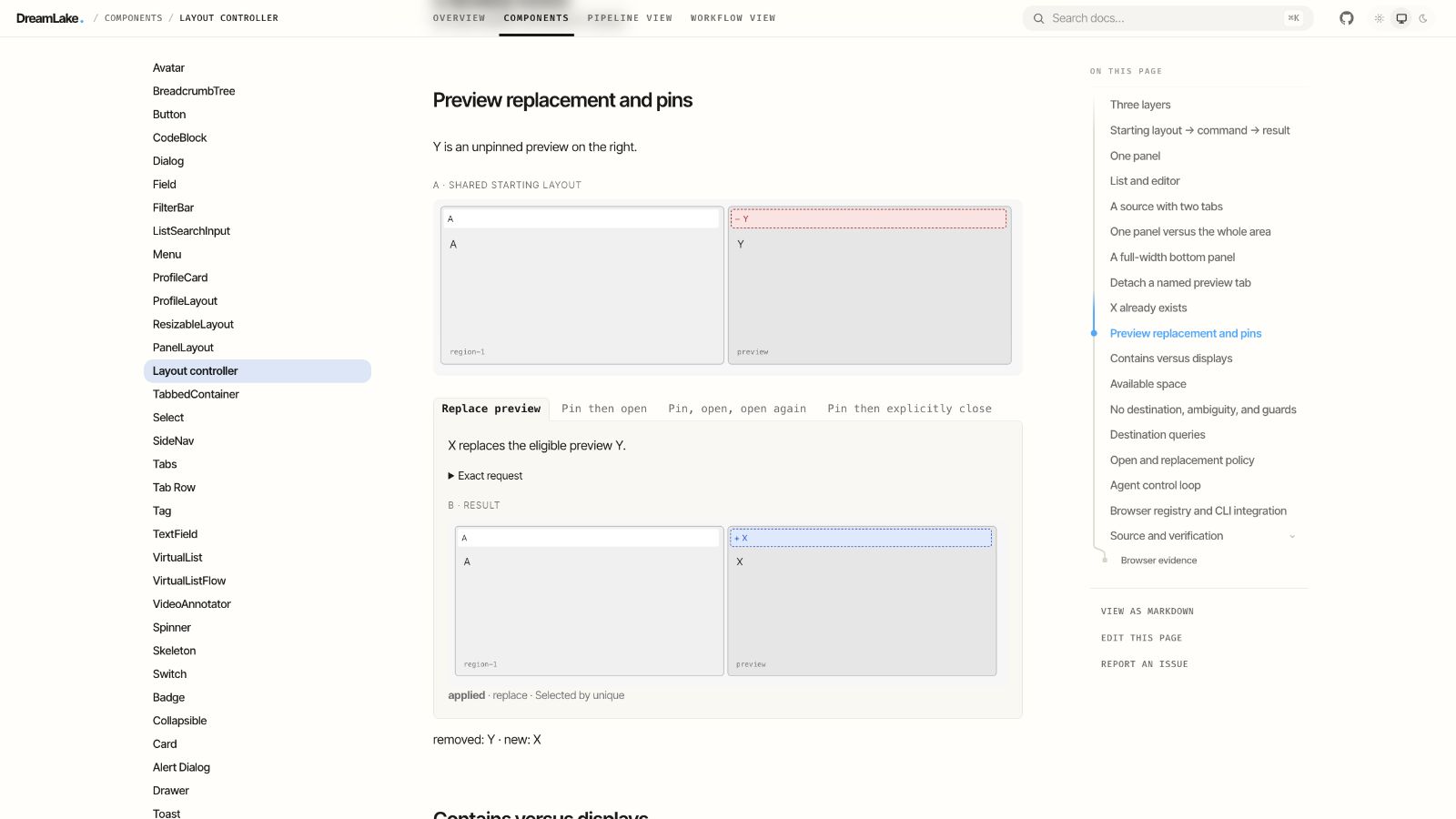
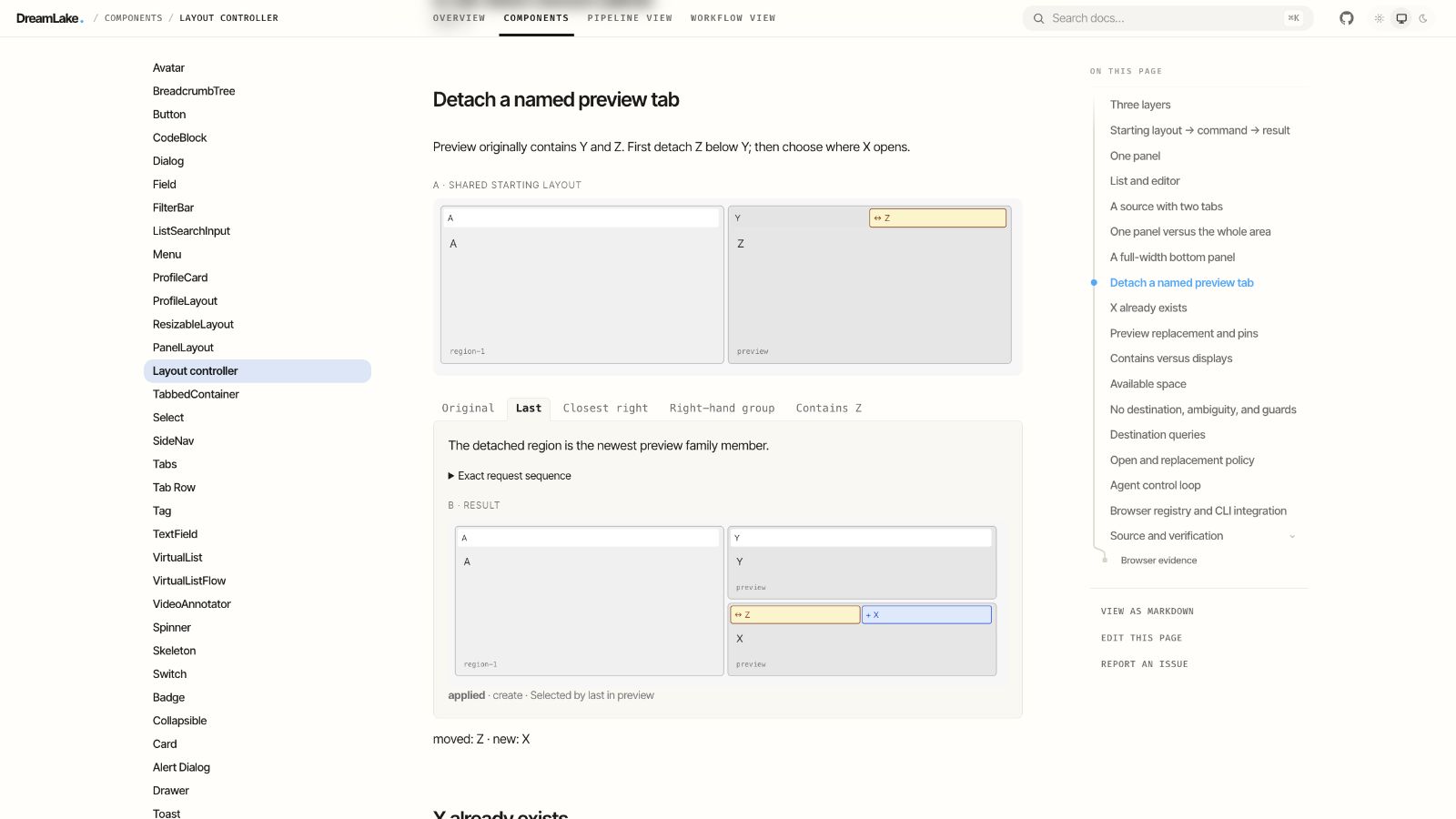
Each set shares one starting layout. Its tabs fork alternative commands from that same state. Open Exact request to see executable JSON. The illustrations are rendered from actual controller snapshots; these are topology diagrams, not product screenshots. Blue + tabs are new, red − tabs are removed from the starting layout, and amber ↔ tabs moved between panels or changed order. Unchanged tabs stay neutral. Dashed tabs are replaceable previews; a dot marks a pinned tab. Hover, click, or use arrow keys to switch branches. Each example has its own section heading and stays within the text column, without an enclosing card.
One panel
Same source, three placements. No existing X.
A · Shared starting layout
A remains mounted behind X.
Exact request
{
  "action": "open",
  "view": {
    "kind": "artifact",
    "resource": "X",
    "title": "X"
  },
  "destination": {
    "id": "A"
  },
  "placement": "tab"
}
B · Result
Resolving
No tabs added, removed or moved.
List and editor
The editor is the source. Only its region is divided.
A · Shared starting layout
The list stays untouched.
Exact request
{
  "action": "open",
  "view": {
    "kind": "artifact",
    "resource": "X",
    "title": "X"
  },
  "destination": {
    "id": "A"
  },
  "placement": "tab"
}
B · Result
Resolving
No tabs added, removed or moved.
A source with two tabs
B is active. Placement beside B means beside its entire panel.
A · Shared starting layout
A and B remain in the same panel.
Exact request
{
  "action": "open",
  "view": {
    "kind": "artifact",
    "resource": "X",
    "title": "X"
  },
  "destination": {
    "id": "B"
  },
  "placement": "tab"
}
B · Result
Resolving
No tabs added, removed or moved.
One panel versus the whole area
A is above B. Choose the placement scope explicitly.
A · Shared starting layout
Only A is split.
Exact request
{
  "action": "open",
  "view": {
    "kind": "artifact",
    "resource": "X",
    "title": "X"
  },
  "destination": {
    "id": "A"
  },
  "placement": "right"
}
B · Result
Resolving
No tabs added, removed or moved.
A full-width bottom panel
A and B begin side by side.
A · Shared starting layout
B keeps its full height.
Exact request
{
  "action": "open",
  "view": {
    "kind": "artifact",
    "resource": "X",
    "title": "X"
  },
  "destination": {
    "id": "A"
  },
  "placement": "below"
}
B · Result
Resolving
No tabs added, removed or moved.
Detach a named preview tab
Preview originally contains Y and Z. First detach Z below Y; then choose where X opens.
A · Shared starting layout
The original named region remains anchored to Y.
Exact request sequence
[
  {
    "action": "move",
    "tabId": "Z",
    "destination": {
      "id": "Y"
    },
    "placement": "below"
  },
  {
    "action": "open",
    "view": {
      "kind": "artifact",
      "resource": "X",
      "title": "X"
    },
    "destination": {
      "name": "preview",
      "select": "original"
    },
    "placement": "tab"
  }
]
B · Result
Resolving
No tabs added, removed or moved.
X already exists
X is inactive behind Y in the right panel.
A · Shared starting layout
No tab order or geometry changes.
Exact request
{
  "action": "open",
  "view": {
    "kind": "artifact",
    "resource": "X",
    "title": "X"
  },
  "destination": {
    "id": "A"
  },
  "placement": "right"
}
B · Result
Resolving
No tabs added, removed or moved.
Preview replacement and pins
Y is an unpinned preview on the right.
A · Shared starting layout
X replaces the eligible preview Y.
Exact request
{
  "action": "open",
  "view": {
    "kind": "artifact",
    "resource": "X",
    "title": "X"
  },
  "destination": {
    "role": "preview"
  },
  "placement": "tab",
  "mode": "preview",
  "role": "preview"
}
B · Result
Resolving
No tabs added, removed or moved.
Contains versus displays
The middle panel contains an inactive artifact Y. The right panel displays artifact Z.
A · Shared starting layout
Two regions qualify; no implicit choice.
Exact request
{
  "action": "open",
  "view": {
    "kind": "artifact",
    "resource": "X",
    "title": "X"
  },
  "destination": {
    "content": {
      "kind": "artifact"
    }
  },
  "placement": "tab"
}
B · Result
Resolving
No tabs added, removed or moved.
Available space
Two empty panels sit to the right of A; their sizes differ.
A · Shared starting layout
Choose the nearer empty panel.
Exact request
{
  "action": "open",
  "view": {
    "kind": "artifact",
    "resource": "X",
    "title": "X"
  },
  "destination": {
    "empty": true,
    "from": "A",
    "direction": "right",
    "select": "closest"
  },
  "placement": "tab"
}
B · Result
Resolving
No tabs added, removed or moved.
No destination, ambiguity, and guards
Only A exists. Failures keep the starting layout intact.
A · Shared starting layout
No implicit creation when a named destination is absent.
Exact request
{
  "action": "open",
  "view": {
    "kind": "artifact",
    "resource": "X",
    "title": "X"
  },
  "destination": {
    "name": "preview"
  },
  "placement": "tab"
}
B · Result
Resolving
No tabs added, removed or moved.
Destination queries
A destination combines filters with one selection rule. Multiple matches are ambiguous by default, not an invitation to pick an arbitrary panel.
| Field | Meaning |
|---|---|
id | Address a current region ID, native node ID or tab's containing panel |
name | Named panel family; split/detached members can remain associated |
role | Panels hosting tabs with an application role, such as preview |
scope, descendants | Search within a region; set descendants false for direct children |
level | Panel by default; area selects a spatial split containing panels |
spanning | Smallest existing area containing all addressed panels; may include other panels |
content, visibility | Exact metadata equality; contains includes inactive tabs, displays considers active tabs only |
empty, replaceable | Filter empty regions or regions with an unpinned preview tab |
minWidth, minHeight | Minimum dimensions in the inspection's geometry units |
from, direction | Panels wholly right, left, above or below the source region |
select | unique, original, first, last, closest, largest or smallest |
First and last use region creation order, not screen order. Original remains anchored to the initial named region; if it closes, original does not silently become another region. Closest uses edge-to-edge rectangle distance. Ties use center-to-center distance, then creation order and stable ID. Sizes use region area. Hidden tabs share their visible panel's bounds; they are not independent spatial candidates.
An area cannot receive a tab directly. Select a child panel or place a new panel beside the whole area. Names are local to one controller session; they are globally addressable within that session. Naming a split area keeps its identity separate from a named family of panels. Layout/session IDs and family creation history are not a cross-reload persistence contract.
Open and replacement policy
Resolution order: validate → check expected revision → reuse an existing resource → select destination → use explicit fallback only on no match → select eligible replacement. Ambiguity never triggers a creation fallback.
placement: tab (default), right, left, above or below.reuse: existing (default) or new-instance. Existing matches kind and resource; prefer an active matching tab, then the first in current layout order.mode: tab (default) always adds a tab; preview can replace an unpinned preview in the destination with the requested role. Prefer its active eligible tab, otherwise the last eligible tab in that group.nameandrole: assign destination-family metadata and tab role to new views.fallback: destination plus placement, applied atomically with creation.
Pinning protects replacement, not explicit movement or close. Reusing an already open resource preserves its pin and preview state. A disposal guard applies before replacement and close. If the layout changes while the guard awaits, the request returns stale without committing its mutation.
Agent control loop
Inspect returns a flat region list, active and inactive tabs, safe descriptors, bounds, names, roles, pins and a revision. Without bounds, geometry is normalized to a 100-by-100 area and reported as such. Resolve reports chosen IDs, candidates, effect and reason. Apply re-resolves and returns applied, blocked, stale, not-found, ambiguous or invalid. Agents should inspect after uncertain delivery before retrying a mutating request.
Other requests: activate and close take tabId; pin takes tabId and pinned;
name takes destination and name; move takes tabId, destination and placement.
All accept an optional ifRevision. Stable tab IDs survive native moves. Replacing
content creates a new instance, so the old view is disposed rather than silently
retargeted under an unrelated document's state.
The host's createView/updateView callbacks materialize validated resource
descriptors. validateView lets resolve reject unsupported resources before any
layout mutation. describe must return undefined only for empty placeholders.
Keep bodies, credentials, tokens and editor state out of descriptor metadata.
Browser registry and CLI integration
createLayoutRegistry() exposes version 1, register, list and dispatch. Dispatch
accepts inspect, resolve and apply. Register each mounted controller with an
explicit ID; call its cleanup function on unmount. A host may expose this registry
as window.dreamlakeLayouts for trusted browser automation. It installs no remote
transport by itself.
DreamLake CLI layout control attaches to an explicitly selected local browser page and layout. DreamLake supplies note, artifact, resource-list and opt-in web-preview descriptors; ordinary web links retain browser navigation.
Source and verification
The examples use layout-examples.ts; the controller test suite executes every
branch. Additional tests cover whole-group placement, named lineage after
native docking, pinned replacement, save guards, concurrent changes, and invalid
requests. The generated UIKit skill includes this reference. This page defines
the generic API; DreamLake documents its application policies separately.
Browser evidence
Local browser verification of the documentation's live branches (September 26, 2026):